advertising photography, commercial photography, management, advertising software, representative software, fine art, stock, studio management, photography invoicing estimating
 
  Homepage
  Description
  Screen Shots
  Tutorial
  Demos
  Newsletter
  Order
  About
 
advertising photography, commercial photography, management, advertising software, photography software, representative, fine art, stock, studio management, photography invoicing estimating
 
advertising photography, commercial photography, management, representative, advertising software, photography software, fine art, stock, studio management, photography invoicing estimating
New Invoice: Step 11
-
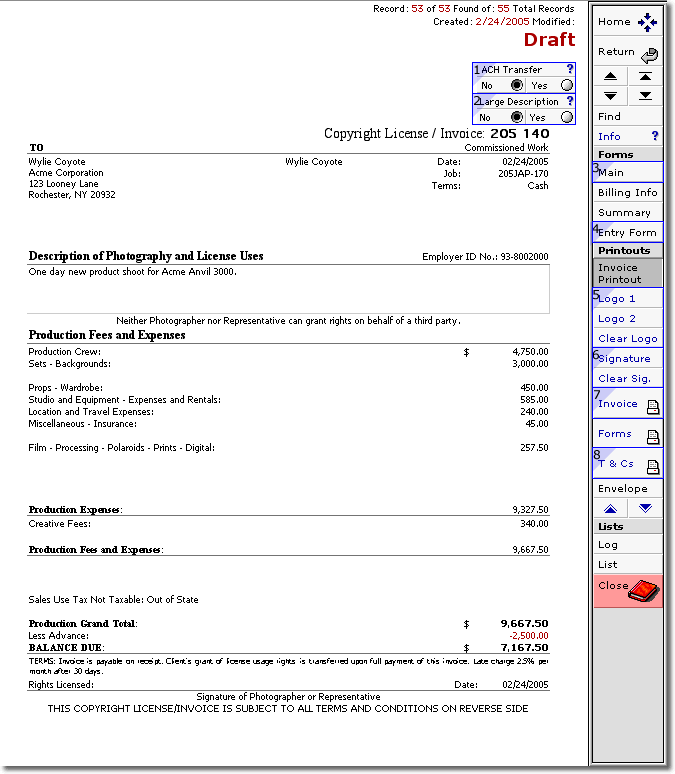
  Click "Yes" to include bank info on invoice for ACH (electronic funds transfer) payment.
  Click "Yes" for 6 lines of text. 4 lines of text is the default.
  Click "Main" to return to Invoice Main page.
  Click "Entry Form" to revise Category details.
  Click "Logo 1" for graphic, "Logo 2" for logo text, or "Clear Logo" to print on letterhead.
  Click "Signature" to have photographer's signature appear on invoice.
  Click "Invoice" print to print and review.
  Click "T & C" to select and print on back of invoice Terms & Conditions as set up in Your Company.
<< Previous
|
Home
>>
 
 
advertising photography, representative, commercial photography, management, advertising software, photography software, fine art, stock, studio management, photography invoicing estimating
 
Description  |  Screen Shots  |  Demos  |  Order  |  About
 
 
How to contact us.
E-mail: info@rlwconcepts.com
RLW Concepts, 403 S. Curson, Los Angeles,
CA 90036
Phone: (323) 938-6287 Fax: (323) 938-1825
advertising photography, representative, commercial photography, management, advertising software, photography software, fine art, stock, studio management, photography invoicing estimating