advertising photography, commercial photography, management, advertising software, representative software, fine art, stock, studio management, photography invoicing estimating
 
  Homepage
  Description
  Screen Shots
  Tutorial
  Demos
  Newsletter
  Order
  About
 
advertising photography, commercial photography, management, advertising software, photography software, representative, fine art, stock, studio management, photography invoicing estimating
 
advertising photography, commercial photography, management, representative, advertising software, photography software, fine art, stock, studio management, photography invoicing estimating

Your Company: Step 6

-
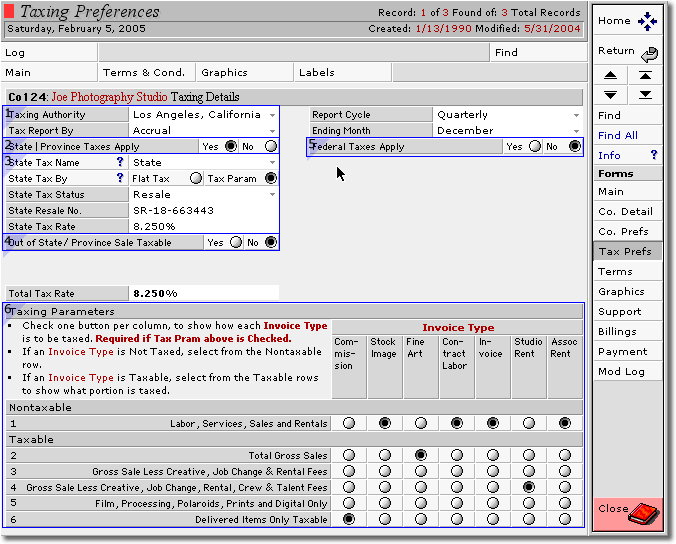
  Your Taxing Authority must be selected. Enter Cash or Accrual in Tax Reported By.
  Select by radio button whether state taxes are applicable.
  Select by Pop up list State Tax Name. Select by radio button Flat Tax or Tax Param. Enter Resale No. State Tax Rate will auto-enter.
  Select by radio buttons whether out-of-state taxes are applicable.
  Select by radio button whether federal taxes are applicable, details are as per state.
  If Flat Tax option is selected ignore this section, otherwise set up options using radio buttons. Verify with your Accountant.
<< Previous
|
Home
>>
 
 
advertising photography, representative, commercial photography, management, advertising software, photography software, fine art, stock, studio management, photography invoicing estimating
 
Description  |  Screen Shots  |  Demos  |  Order  |  About
 
 
How to contact us.
E-mail: info@rlwconcepts.com
RLW Concepts, 403 S. Curson, Los Angeles,
CA 90036
Phone: (323) 938-6287 Fax: (323) 938-1825
advertising photography, representative, commercial photography, management, advertising software, photography software, fine art, stock, studio management, photography invoicing estimating